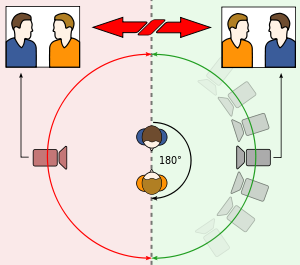
180° rule
The 180° rule is a basic guideline when film making. It is said that two characters, or a character and an object should always have the same left and right relationship on screen. There is an imaginary line, called the axis, that will connect the characters if keep the camera is kept on one side of the line for every shot. The first character should always be on the right hand frame of the second character that should be on the left hand frame. The object must always stay in the centre whilst the camera faces towards the object. If the camera is to cross over the line, you must show that you are crossing the line. The camera passing over the cross over the axis (the invisible line) it is often called 'crossing the line' or 'jumping the line' We didn't include this in our film as we didn't have a scene where this was incorporated. To improve our film I would redo it and put a scene in where we use the rule.
Match on match action
Is a cut between two shots that place two different shots
of the same action next to each other. This makes the shots flow smoothly without interruption. This is part of a editing technique called continuity editing. It is also known as 'cutting on action'. We have an example of this when Georgia is typing on her phone - we started with a long shot, then cut to a
medium shot and then close up of her typing into her phone. We edited the film in premiere pro and edited the shots into a 'match on match' action.
Eye-line match
This means that the eye-line of the person in one shot has to line up with the person/ thing they’re looking at in the next shot. in order to get this to work effectively, you need to put both camera positions at a similar distance from the ‘axis’ If one person is taller than the other, the taller person should be looking down, and the smaller person should be looking up. We didn't incorporate this into our film as we didn't get a chance to film the scene.
How did the film making go?
Although the filming process was slow, due to us being unfamiliar with the cameras, and how to film (as evident with the short amount of footage we created) I think the filming went well.We tested different shots - long shots, medium shots and close ups. We also experimented with panning but the results were unsuccessful. There were certain shots in which we were talking, or giggling where we didn't want it, however we managed to cancel this out during out editing process by adding music. I struggled with editing to start with, but as I became more familiar with Premiere Pro, I became more confident and enjoyed learning how to use the software.
What have I learnt?
During this task, I learnt how to use the camera and understand what different shots are, and how to use them. I learnt how to cut down pieces of footage and edit them to transition into each other in Premiere Pro. I also learnt how to layer music on top of the footage we had filmed and how to arrange the shots so that they flow into each through a 'match on match' shot.

No comments:
Post a Comment